Access and staff roles
Give every writer, producer, editor, and manager enough access to do the job without opening the whole control room.
- Login comes from
- The main WNY Athletics account
- Desk role lives in
- Settings → Staff
- Normal offboarding
- Deactivate, then review assignments
The two parts of access
A person first needs a WNY Athletics login. News Desk then matches that exact username to a Staff row. The login proves who the person is; the Staff row decides what newsroom work they may do.
Site administrators are treated as News Desk admins even when they do not have a Staff row. Use that broad access only for people who actually manage the whole website.
Choose the right role
- Contributor — creates and edits their own drafts, submits them, sees their calendar and statement, and stops editing after submission.
- Staff Author — creates manual posts, edits their own work through draft and submitted stages, and can respond to requested changes. They cannot publish.
- Editor — sees all posts, works the review queue, publishes and unpublishes, manages contests, score feeds, standings, scoreboard sports, and the AI recap pipeline.
- Admin — has every editor ability plus staff, personas, tags, post types, desk settings, and credential management.
- Payroll manager — is an extra checkbox for an editor. It opens payroll without granting the rest of the admin settings.
Add or change a staff member
-
Confirm the person can sign in
Have the staff member sign in once and send you the exact username shown in their account.
-
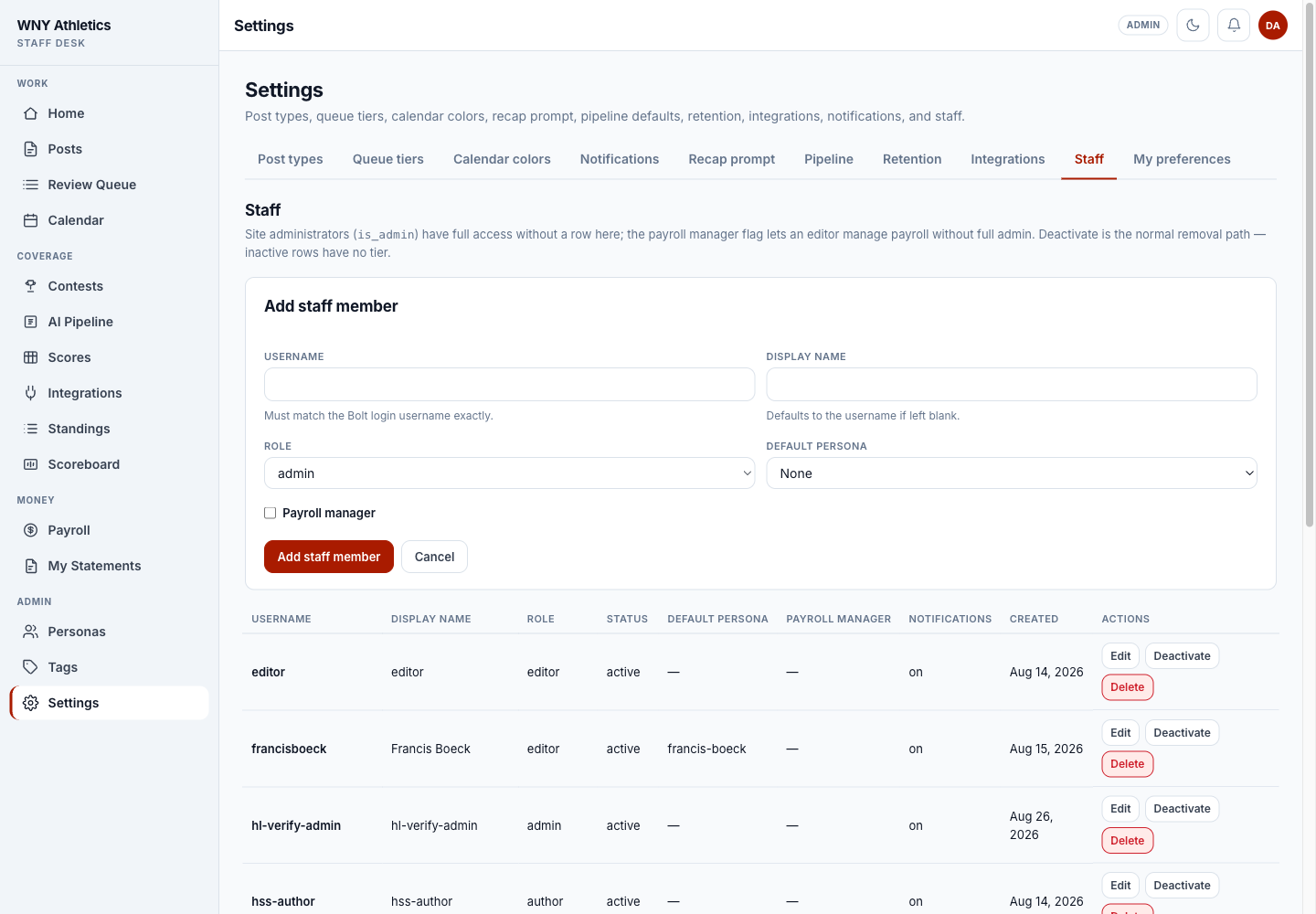
Open Settings → Staff
Only a News Desk admin can open this tab.
-
Enter the username and display name
Use the account username exactly. The display name may be a familiar byline or on-air name.
-
Choose the smallest useful role
Start contributors and staff writers below editor. Add Payroll manager only to the person who records and reconciles payments.
-
Save and ask them to reload
Role changes take effect immediately. A reload shows the correct menu.
-
Settings tabs keep people, integrations, content types, and preferences in one admin area.
-
Add the exact login username and a friendly display name.
-
Choose the newsroom role; payroll is a separate editor-level flag.
-
Edit or deactivate existing staff from the roster below.
Remove access safely
-
Deactivate the Staff row
Deactivation ends News Desk access immediately and keeps the historical name on assignments and records.
-
Review open assignments
Move unfinished work to another staff member before the next deadline.
-
Review scheduled posts and payments
Confirm scheduled coverage still has an editor owner and that any earned payables remain attached to the correct username.
-
Remove the main login when appropriate
Website-account removal is separate from News Desk. Coordinate it with the site administrator after the desk work is reassigned.
Frequently asked questions
Can a staff author publish their own story?
No. Staff authors submit work; an editor or admin publishes it.
Can an editor manage payroll?
Only when an admin checks Payroll manager on that editor’s Staff row.
Why does a valid login still show Staff access required?
The account is valid, but its exact username is missing from the active News Desk Staff roster.
Does deactivation erase the person’s bylines?
No. It removes current access while preserving existing posts, assignments, and financial history.