Run the AI recap pipeline
Package final-game facts, produce structured recap files, import them as submitted drafts, and keep a human editor at the publishing gate.
- Starts with
- Final contests with results
- Returns as
- Submitted tier-2 articles
- Human decision
- Every publish
What the pipeline does
The pipeline exports verified contest data and desk instructions into a ZIP. The approved recap-writing workflow produces one structured Markdown file per contest. Import turns those files into Submitted articles with a desk persona and social suggestions.
It does not publish. An editor still checks the source facts, writing, byline, social copy, and public presentation.
-
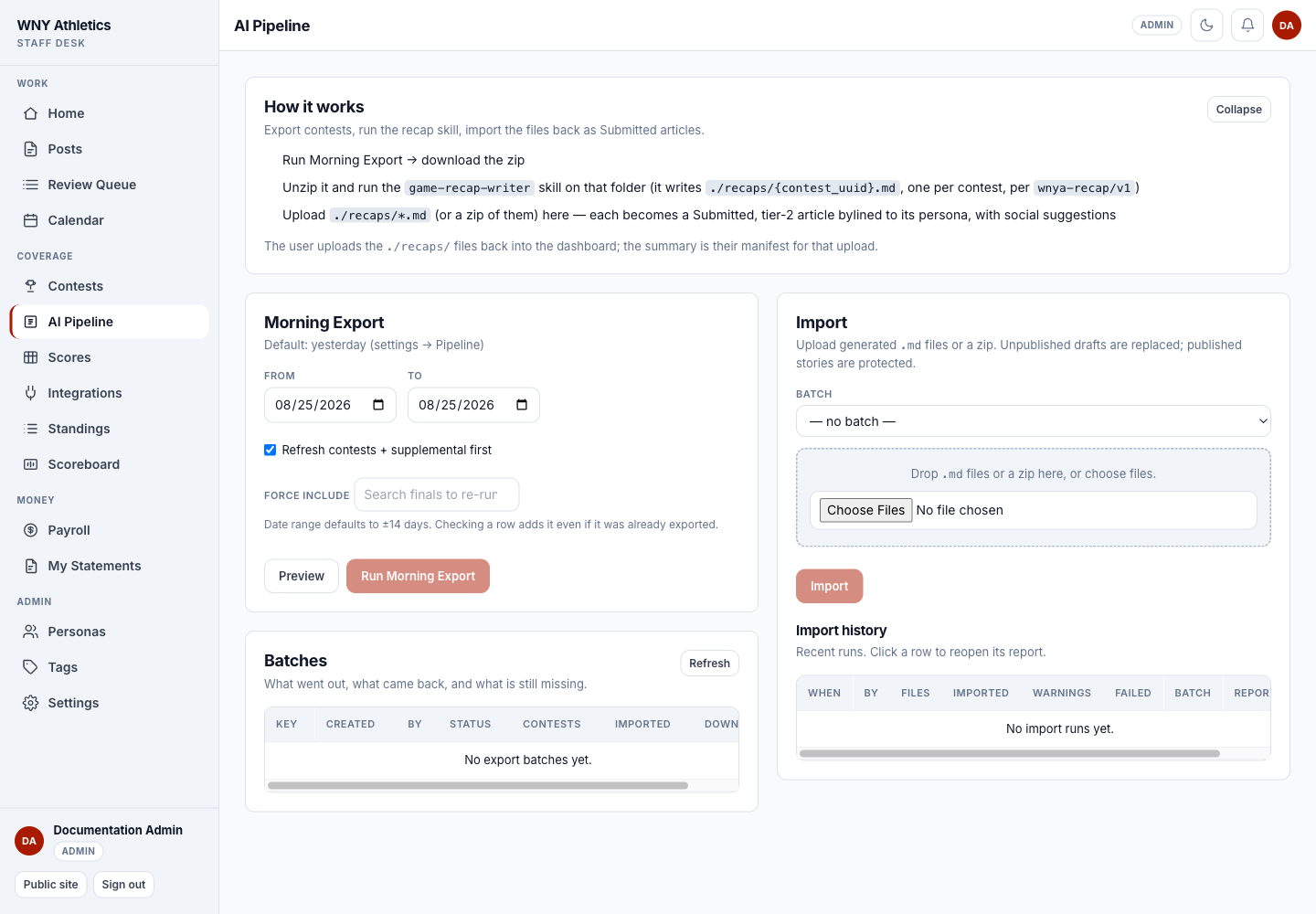
How it works summarizes the exact export → recap skill → import sequence.
-
Morning Export chooses dates, previews eligible finals, and creates the ZIP.
-
Import accepts recap Markdown files or a ZIP and associates them with a batch.
-
Import history preserves warnings, failures, and a downloadable report.
Before a run
- The correct season and contests have been fetched.
- Final games have scores and the available supplemental results/statistics/rosters/comments.
- Active personas have useful voice notes, sport affinities, and rotation weights.
- Settings → Recap prompt contains the approved base instructions and any sport addenda.
- Settings → Pipeline has the intended export window and import-date rule.
- An editor is assigned to watch the review queue after import.
Export the contests
-
Open Coverage → AI Pipeline
The default export window usually targets yesterday. Adjust From/To only when catching up or rerunning a known set.
-
Leave Refresh contests + supplemental on when appropriate
This updates the source facts before the package is assembled. Turn it off only when the feed has already been verified or is intentionally unavailable.
-
Choose Preview
Review eligible finals, skipped games, assigned personas, and warnings. Games without results or with a prior export are skipped unless forced.
-
Override a persona only for an editorial reason
Automatic rotation considers sport affinity, recent use, rotation weight, and last assignment.
-
Choose Run Morning Export and download the ZIP
The batch records what went out and what is still waiting to come back.
Produce the recap files
-
Unzip the export into a working folder
Keep the manifest and one contest file per game together.
-
Run the approved game-recap-writer workflow
It reads only the exported facts and writes one recap file per contest into the recaps folder.
-
Do not hand-edit identifiers
The contest UUID and persona slug connect the recap to the correct game and byline. Changing them can fail the import or attach the wrong record.
-
Spot-check the files before upload
Confirm title options, recap body, persona, and social suggestions are present and that no unsupported facts were introduced.
Import and review
-
Choose the matching batch
The batch lets News Desk track which exported contests returned.
-
Upload the recap files or ZIP
Each valid file becomes a Submitted article. The assigned persona is primary and the social suggestions are attached.
-
Read the import report
Imported, warning, and failed counts matter. Open every failure reason; download the CSV when handing a cleanup list to another staff member.
-
Open the Review Queue
Filter AI drafts and the batch date. Editors must verify game facts, names, tone, links, byline, and social suggestions.
-
Publish only after normal review
The importer deliberately stops at Submitted. Use the same review, approval, schedule, and publish rules as a human-written draft.
Reruns and failure handling
- Already exported — use Force include only when a corrected source file or deliberate rerun is required.
- Unknown or inactive persona — correct the persona roster/slug; the file does not silently fall back to another byline.
- Already published — import refuses to overwrite published or archived coverage.
- Unpublished recap re-import — the same contest recap replaces its existing unpublished draft instead of creating a duplicate.
- Warnings — the file may import, but the editor must read the warning and inspect the affected field.
- ZIP rejected — confirm the archive contains supported recap files and stays within the displayed file/resource limits.
Frequently asked questions
Why was a final game skipped?
Common reasons are no stored result, already exported, not actually final, or an unknown contest identity.
Does the import publish recaps?
No. Valid recaps enter the review queue as Submitted articles.
Can I import one file again?
Yes while its recap remains unpublished. The same contest identity replaces the existing draft.
How is a persona selected?
The rotation favors sport affinity, then balances recent use against rotation weight, with last assignment as a tie-breaker.
What does rotation weight zero mean?
The persona is never auto-assigned by the exporter but may still be assigned manually.