Publish standings
Build useful sport pages from live High School Sports tables, staff-maintained groups, or a hybrid of both.
- Public home
- /standings
- Available views
- League, division, class
- Source choices
- HSS API, manual, hybrid
Create the sport catalog
-
Open Coverage → Standings
The catalog row becomes a sport card on the public /standings page when Published is on.
-
Choose a stable slug
The slug becomes part of the public URL. Do not change it casually after sharing links.
-
Set the season and source
Use the same season label readers expect to see and choose HSS API, Manual, or Hybrid.
-
Enable the useful views
Turn on league, division, and/or class based on the sport’s actual organization. Choose the best default.
-
Publish after the first check
Refresh or enter the groups, then check the public page before publishing the catalog row.
-
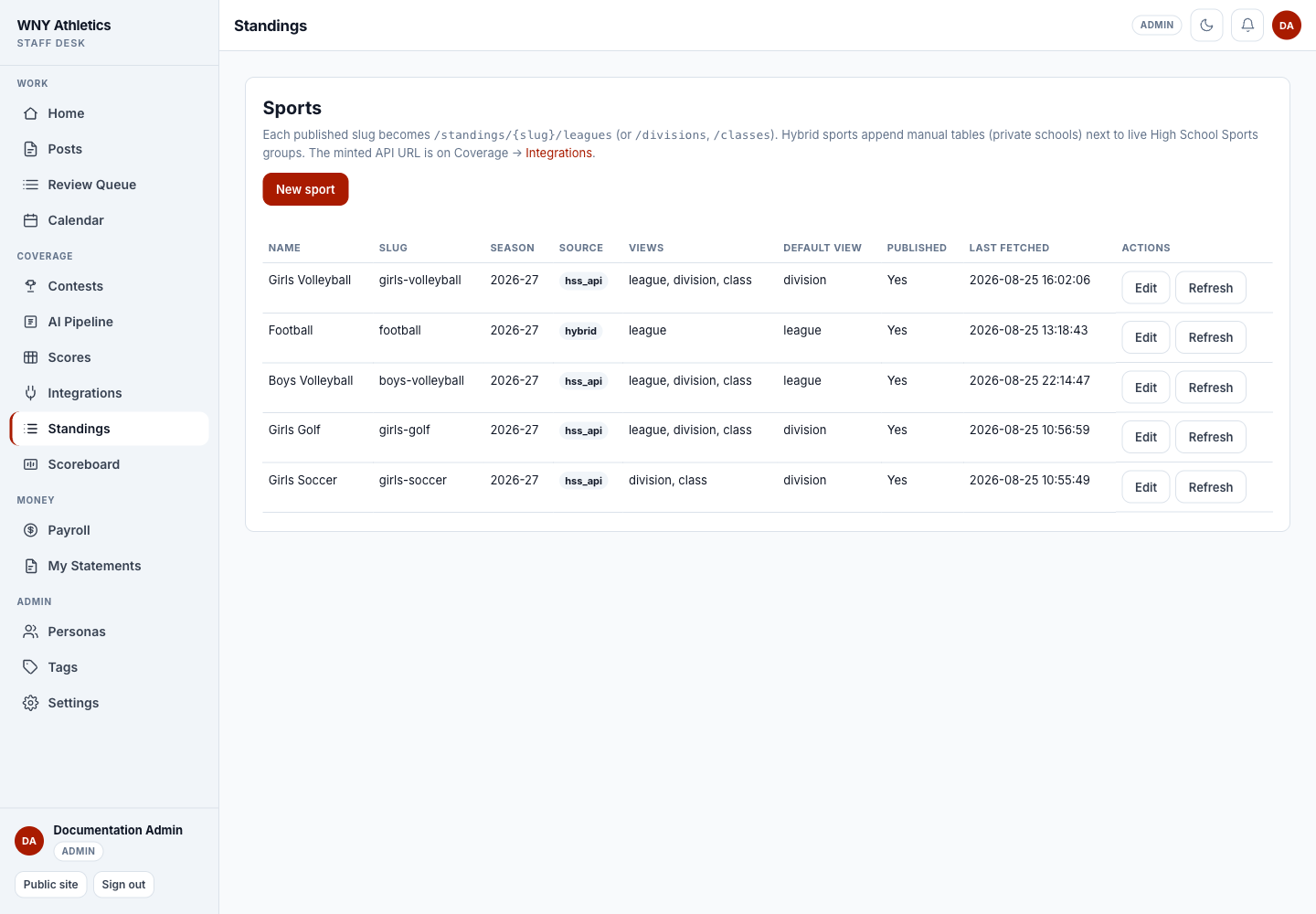
New sport creates a standings catalog row.
-
Source and Views explain how each public page is assembled.
-
Published and Last fetched show whether readers can see current data.
-
Edit configuration or refresh the live HSS groups.
Choose the right source
- HSS API — live groups and rows come from High School Sports. Staff can refresh, hide, restore, and reorder group shells, but not edit individual HSS rows.
- Manual — staff creates groups and edits every row. Use it for leagues not available through the private feed.
- Hybrid — HSS groups remain live while staff adds manual groups, such as a private-school table, into the same public stack.
Manage public groups
-
Open the public sport page as an editor
Use Manage to work with the tables in the same order readers see them.
-
Add a manual group when needed
Name it for the league, division, class, or special table readers will understand.
-
Enter manual rows
Keep team naming, win/loss fields, and any extra record columns consistent with the page.
-
Hide or restore HSS groups
Hide a feed group when it should not be public. This does not edit or delete its upstream rows.
-
Drag groups into editorial order
The public stack may mix HSS and manual tables. Put the groups in the order WNY Athletics wants readers to scan them.
Refresh and verify
- The shared High School Sports connection tests successfully.
- The sport’s HSS geography override is blank unless this sport truly needs a different path.
- Refresh completes without exposing a token in the message.
- League/division/class toggles match the data actually returned.
- Hidden and manual groups are still in the intended order.
- The public /standings sport card and default view load on desktop and mobile.
Frequently asked questions
Can I edit one team’s HSS record in News Desk?
No. HSS rows are feed-owned. Staff may edit only manual groups and rows.
What is a hybrid sport?
It displays live HSS groups and staff-maintained manual groups together on one public sport page.
Why is a sport missing from /standings?
Confirm the catalog row is Published and has at least one enabled view.
Does refresh remove manual groups?
No. Manual tables remain local and are appended/reordered alongside HSS groups.