Social, broadcasts, and podcasts
Prepare distribution copy and keep WNY Athletics live and on-demand listings accurate.
- Story social copy
- Post editor → Social
- Broadcast schedule
- Coverage → Broadcasts
- Podcast listings
- Site Admin → News Desk → Podcasts
Use the Social Desk
The site-admin News Desk panel contains the older Social Desk queue. It groups unposted suggestions by article and provides Copy, Copy thread, Mark posted, and Skip actions. Because the outer Site Admin area is administrator-only, normal writers and editors work from the post editor instead.
- Copy — copies one suggestion.
- Copy thread — copies the article’s complete suggestion thread.
- Mark posted — records that the item was used outside News Desk.
- Skip — removes the item from the unposted queue without claiming it was published.
Maintain broadcasts
The public Broadcasts schedule is driven from Coverage → Broadcasts on the staff desk. Title and Starts at are required. Status, platform, stream URL, persona, notes, and embed code are optional until you go live. Saving the record is what places it on the public schedule — there is no separate calendar add step.
-
Open Coverage → Broadcasts
Use Table or Board to scan upcoming and past listings. Import is available when production sends a spreadsheet instead of one-off entries.
-
Choose New broadcast
Fill Title, Sport, Starts at (affiliate timezone), Platform, URL, Status, Persona, Notes, and Embed code. Embed preview shows the player HTML as it will appear.
-
Keep status current
Use scheduled before air, live while the stream is active, completed afterward, or canceled when the event will not air. The list status dropdown can patch status without reopening the drawer.
-
Save, then verify the public Broadcasts page
Check start time, title, stream player or link, and whether the item appears in the correct upcoming or past group.
-
Import a batch when you have many rows
Choose Import, upload a spreadsheet or paste rows, map Date and Event (required), preview, and commit. Download sample CSV if the column names are unfamiliar.
Maintain podcasts
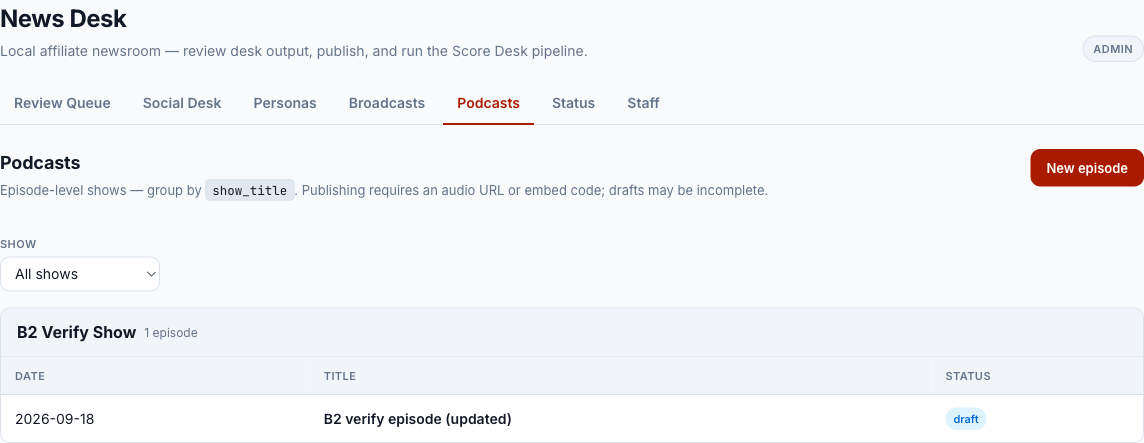
Podcast listings are episode-level. Show title is a grouping label, not a separate show record. Draft episodes may be incomplete; a published episode needs either an audio URL or an embed code.
-
Open Site Admin → News Desk → Podcasts
Use the show filter to find the existing series before creating an episode.
-
Choose New episode
Enter title, episode date, show title, description, and the audio URL or embed supplied by production.
-
Save as Draft while production is unfinished
Draft episodes do not appear in the public published list.
-
Publish and verify playback
Confirm the public podcast page and feed can load the audio or embed before promoting it.
-
Choose Social Desk, Broadcasts, Podcasts, Status, or Staff from the internal tabs.
-
New episode opens the episode editor.
-
Filter the list by show title.
-
Select an episode row to edit, publish, unpublish, or delete it.
Know the staff-dashboard content types
The staff dashboard may also offer Podcast Episode, Broadcast, Sideline Interview, and Highlight Clip post types. They use the common review, calendar, assignments, and payroll workflow. Highlight Clips have a public adapter. Podcast and Broadcast posts do not automatically replace the separate legacy podcast/broadcast listing records unless a publish adapter is added.
Frequently asked questions
Can every editor open the Social Desk panel?
No. It sits inside the administrator-only Site Admin area. Editors can work social suggestions on each post’s Social tab and maintain the public schedule under Coverage → Broadcasts.
Why will a podcast not publish?
Published episodes require an audio URL or an embed code. Save it as Draft until one is available.
Does Mark posted send anything to X or Instagram?
No. It records the result after a person posts through the normal social account workflow.
Do Broadcast statuses change automatically?
No. scheduled, live, completed, and canceled are maintained from Coverage → Broadcasts.
Social copy on a post
Open the post’s Social tab
Suggestions are grouped by X and Instagram. Imported recap drafts may already include them.
Check the facts against the final post
Confirm names, score, opponent, quote, link, and platform length. Social copy is a suggestion, not a second source of truth.
Add or revise the platform copy
Keep X concise. Give Instagram enough context to make sense without relying on a link preview.
Publish or copy
Direct Publish to X is available only when the configured account connection is ready. Otherwise copy the text and post through the normal platform workflow.
Mark the suggestion used
Mark used after posting so the next shift does not duplicate it.