Settings and troubleshooting
Configure the desk’s shared rules and work through the most common handoff problems without guessing or exposing credentials.
- Admin settings
- News Desk → Settings
- System health
- Site Admin → News Desk → Status
- First recovery step
- Read the visible error and verify access/source
What each settings tab controls
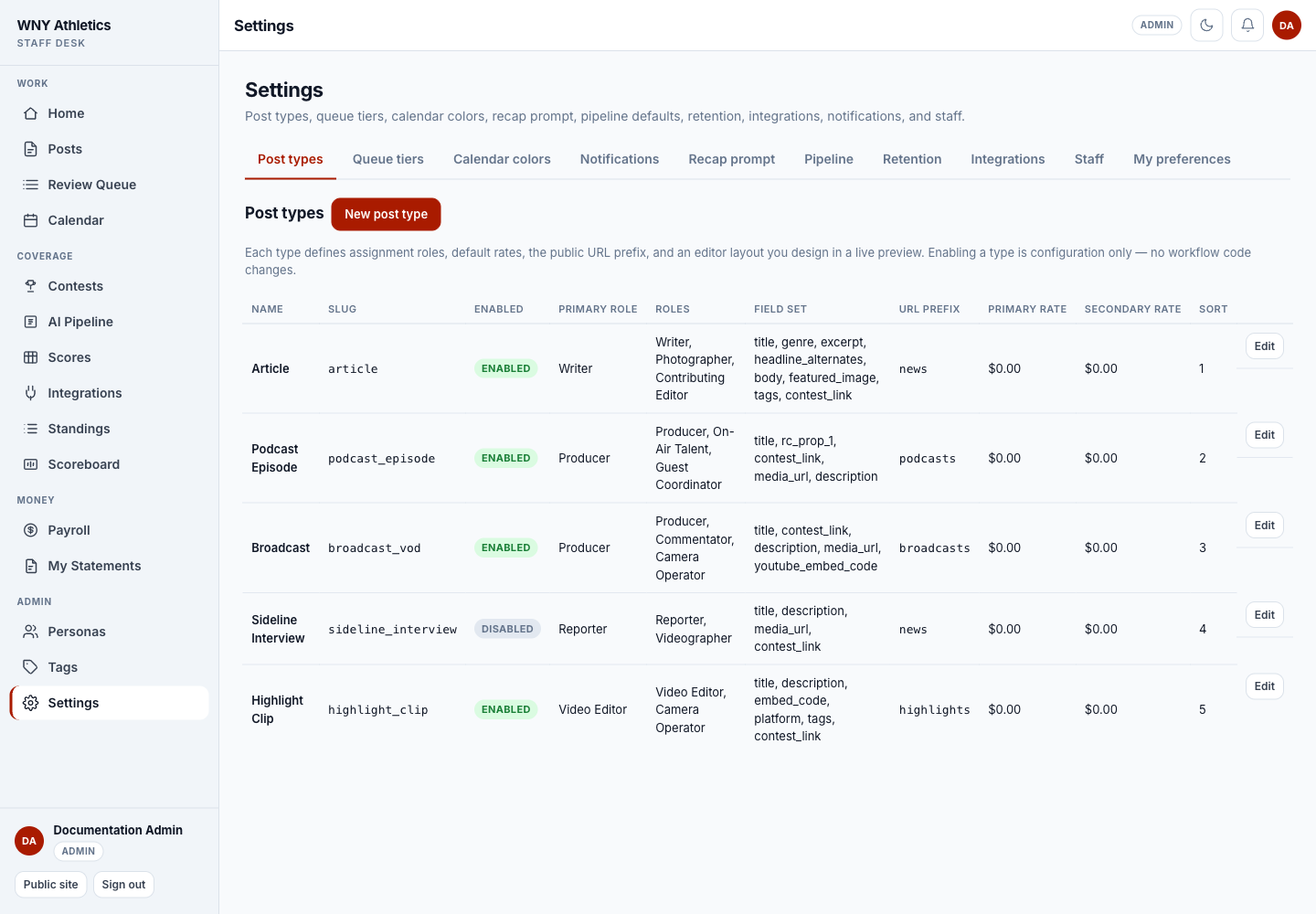
- Post types — enabled formats, assignment roles, editor layout, public template, URL prefix, and default rates.
- Queue tiers — relative priority assigned to staff-author, AI-persona, and contributor submissions.
- Calendar colors — the status colors used by the planning calendar.
- Notifications — desk-wide kill switch. Staff also have a personal notification preference.
- Recap prompt — approved base instructions, sport addenda, and an assembled preview for AI recap exports.
- Pipeline — export window, import publish-date rule, and coverage-gap lookback.
- Retention — how many raw hub responses and score payloads are kept for troubleshooting.
- Integrations — named inbound content endpoints with rotatable URL tokens and one-time Bearer secrets.
- Staff — exact usernames, roles, payroll-manager access, status, and notification preference.
- My preferences — the signed-in administrator’s own notification switch.
-
Settings tabs divide desk-wide policy by job.
-
Each post type lists roles, fields, URL prefix, rates, and enabled state.
-
Enabled controls whether staff can create that type.
-
Edit opens the type configuration and its layout/template designers.
Manage post types safely
-
Start from an existing type
Read its roles, fields, URL prefix, rates, and public behavior before creating a new one.
-
Use a stable technical slug
The slug identifies the type in records and integrations. The public URL prefix is a separate hyphenated path.
-
Define one primary assignment role
The primary role drives the main byline/rate slot. Add secondary roles only when the production workflow needs them.
-
Design the editor layout
Choose and arrange only the fields staff need. Unknown custom fields are stored as text, so label them clearly.
-
Design and test the public template
Use the live preview and verify a real published example on mobile and desktop.
-
Set rates before enabling
A $0.00 rate deliberately creates no payable for that slot. Record rate approval outside the software.
-
Confirm the publishing adapter
A generic type participates in workflow, calendar, and payroll. It needs a public adapter/template to appear in the intended reader-facing collection.
Scheduled publishing setup
Editors can schedule posts in the dashboard, but the server must run the CLI-only publisher on a recurring schedule. The production operator should install a cron/system task using absolute paths, run it as a minimally privileged service account, and alert on missed or failed runs.
- The production command runs extensions/news-desk/bin/publish-scheduled.php with the correct PHP binary and project path.
- One due test post publishes exactly once; the second run does nothing.
- The publish creates expected notifications and eligible payables once.
- Non-zero exit, timeout, and missing runs reach the named operator.
- Queue/detail page loads are never used as a substitute for the scheduler.
Common problems
-
“Staff access required” after login
Confirm the exact account username appears as Active under Settings → Staff. Site admins are implicit News Desk admins.
-
A writer cannot edit after submission
That is expected for Contributors. An editor may return the item to Draft or request changes. Staff Authors have broader access to their own submitted work.
-
A scheduled post did not publish
Check the stored scheduled time/timezone, then ask the technical owner for the publish-scheduled.php run and error log. Do not repeatedly change status until the scheduler state is known.
-
HSS test or refresh fails
Check that the private connection says Configured, the geography/season path is correct, and the High School Sports credential is still active. Error messages are intentionally redacted.
-
Score import removes unexpected contests
Stop before commit. Review dataset scope, removed rows, and orphan warnings. Dataset commits are complete swaps.
-
Podcast will not publish
Add an audio URL or embed code. A draft may be incomplete; Published may not.
-
A published post created no pay
Check active human assignments and effective rates. Personas and $0.00 rates intentionally create no payable.
-
Social graphics are missing
Confirm the media file exists at the stored path and is reachable from the site. Marking a suggestion posted does not create or repair its graphic.
Handoff checklist
- At least two named staff members can sign in and one can recover another person’s access.
- Every Staff role and payroll-manager flag has an owner-approved reason.
- High School Sports, inbound integrations, and score-agent credentials have named owners and secure rotation procedures.
- The scheduled publisher, logs, alerts, backups, and restore runbook have a technical owner.
- Current post types have tested public outputs and approved rates.
- The recap prompt, personas, sport affinities, and AI review expectations are documented for editors.
- Payroll has a closeout owner and a reconciliation/export routine.
- The public News, Scoreboard, Standings, Broadcasts, Podcasts, and Highlights pages have a named verification checklist.
Frequently asked questions
Where can I see system status?
A site administrator can open Site Admin → News Desk → Status. Opening the tab does not ping the external hub; Ping is a separate action.
Can Settings reveal a saved secret?
No. Private tokens are redacted or shown only once at creation/rotation.
Can I disable notifications for just myself?
Yes. Use My preferences or the Notifications page. The admin Notifications switch disables creation for everyone.
What should I collect before asking for technical help?
Record the page, exact visible message, approximate time, username/role, action attempted, and whether the problem affects one item or every item. Never include a token, password, or session cookie.
Should staff run database schema updates?
No. Schema changes, backups, and restore verification belong to the technical owner unless a documented release procedure explicitly assigns them.