Connect High School Sports
Set up the private highschoolsports.org feed used by the public scoreboard and standings without exposing or confusing its credential.
- Configure at
- Coverage → Integrations
- Credential form
- Minted URL with token in its path
- Shared by
- Scoreboard and Standings
Know the three connections
News Desk has three credentialed feed systems. They solve different jobs and their tokens are not interchangeable.
- High School Sports private API — a minted highschoolsports.org base URL with a 64-character path token. It supplies scoreboard and standings data. Configure it under Coverage → Integrations.
- Inbound content integrations — a named News Desk endpoint URL plus a Bearer secret for an outside system that creates or updates posts. Configure it under Settings → Integrations.
- Score datasets — a per-dataset agent URL plus token for complete score-file feeds. Configure it under Coverage → Scores.
Before you begin
- A High School Sports administrator has minted the private API URL for WNY Athletics.
- The URL begins with the approved highschoolsports.org API path and includes the path token.
- You know the default geography path for coverage — WNY Athletics currently uses the New York / NYSPHSAA / Section 6 path.
- You are signed in as a News Desk editor or admin.
- You have a secure place to record the original credential in case it must be reissued. News Desk will not show the token again.
Save and test High School Sports
-
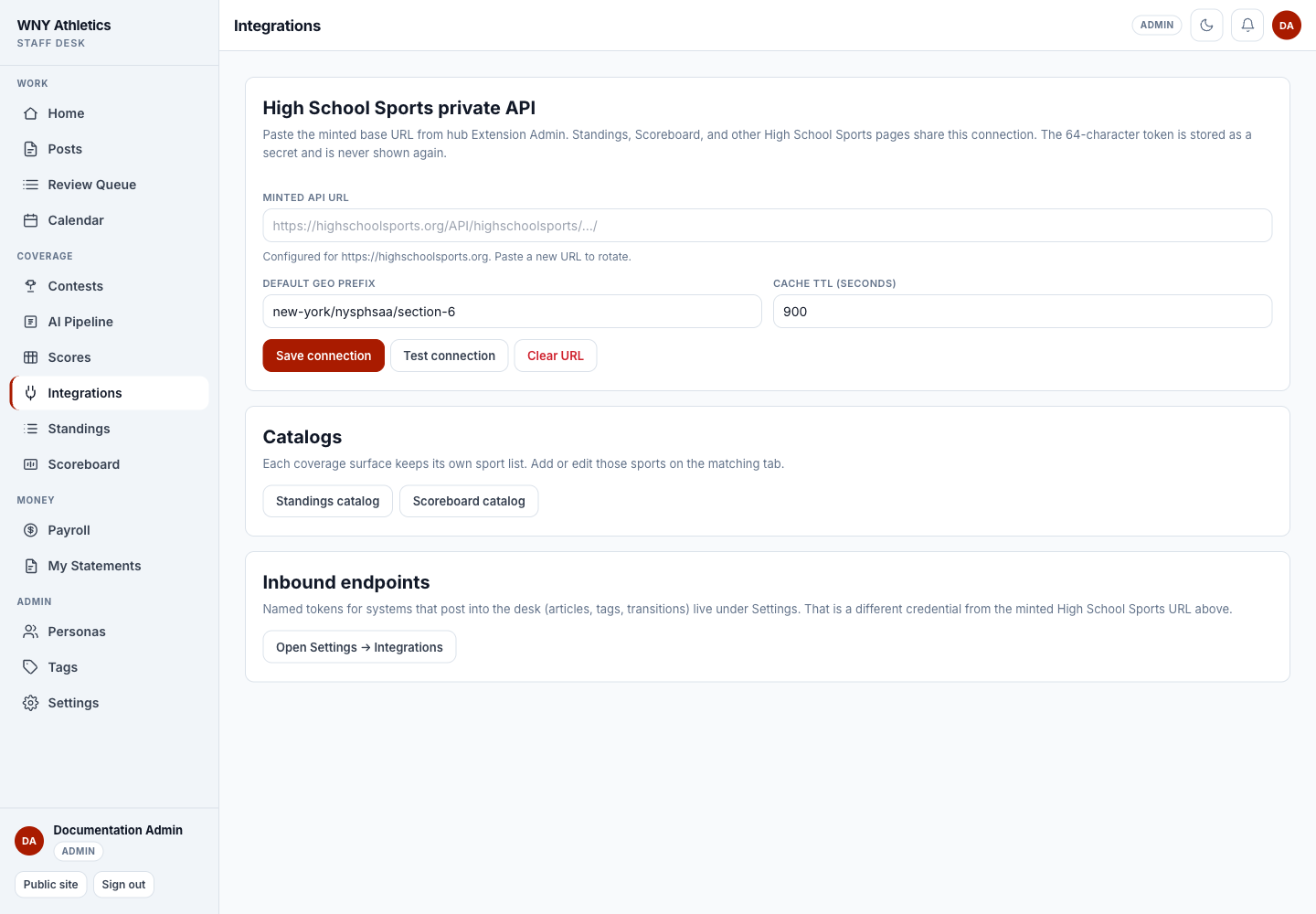
Open Coverage → Integrations
The page is titled High School Sports private API. Do not use Settings → Integrations for this connection.
-
Paste the complete Minted API URL
Paste the base URL exactly as supplied. The token is extracted and stored as a secret; later reads show only the origin and whether a token is configured.
-
Confirm the Default geo prefix
Use the path that matches the territory. A sport may override it later when its HSS data lives under a different path.
-
Set Cache TTL
TTL is the number of seconds a successful feed response may be reused. The default screen value is 900 seconds (15 minutes).
-
Choose Save connection
The URL field clears after saving. A configured message shows the origin, not the token.
-
Choose Test connection
News Desk makes one representative request and returns a redacted success or error. The token is never included in the message.
-
Paste the complete minted base URL here; it is blank after save.
-
Default geo prefix scopes coverage to the intended territory.
-
Cache TTL balances freshness against repeated HSS requests.
-
Save, test, or deliberately clear the private URL.
Add sports to the correct catalogs
Saving the connection does not publish any sport by itself. Scoreboard and Standings maintain separate catalogs because they present different information.
-
Open Scoreboard catalog
Add the sports that should be selectable on /scoreboard. Choose HSS API for feed-backed sports and Manual for sports managed entirely by staff.
-
Open Standings catalog
Add each sport and choose HSS API, Manual, or Hybrid. Select the public league/division/class views and a default view.
-
Publish deliberately
Only published catalog rows appear to readers. Finish the setup and refresh once before switching a sport on.
-
Check the public pages
Open /scoreboard and /standings. Confirm sport filters, groupings, dates, and last known data.
Rotate or clear the connection
Paste a newly minted URL and Save connection to rotate the credential. The old URL should be revoked at its source. Clear URL disables HSS-backed fetches; it does not delete manual scoreboard games or manual standings tables.
Set up an inbound article integration
Use Settings → Integrations only when an outside system needs to create or update News Desk posts. An admin gives the integration a label and optional default staff author/persona. News Desk creates an endpoint URL and a separate Bearer secret.
-
Create the named integration
Choose a label that names the sender, such as High School Sports Articles. Set a default author or persona only when the sender should use it when no author is supplied.
-
Copy both values immediately
The endpoint URL contains a path token. The Bearer secret is shown once. Give both to the integration owner through the approved secure channel.
-
Test discovery before posting
The sender should call the endpoint with its Bearer secret, then read the authors and tags catalogs before sending posts.
-
Keep external IDs stable
The sender’s external ID lets the same item update instead of creating duplicates.
-
Rotate one credential at a time
Rotating the endpoint token changes the URL and makes old URLs return not found. Rotating the secret keeps the URL and makes old secrets unauthorized.
Frequently asked questions
Why is the minted URL field blank after saving?
That is intentional. News Desk stores the token as a secret and returns only configured/origin information.
Does Test connection publish or change any score?
No. It performs one redacted test request.
Can the inbound integration secret be used for the scoreboard?
No. Inbound posts, HSS private data, and score datasets use separate credentials.
What happens to the public scoreboard if HSS is temporarily unavailable?
The server keeps the last good HSS rows when available and still includes manual rows; staff should verify the public timestamp and result.
Who should rotate credentials?
A News Desk admin should coordinate the change with the High School Sports or sending-system owner so old credentials can be revoked and the new ones tested.