Run the scoreboard and score feeds
Use the public-scoreboard catalog for day-to-day games and the Scores area for complete file-based contest feeds.
- Public filters come from
- Coverage → Scoreboard
- Manual game import
- CSV or XLSX
- Dataset commit
- Replaces the dataset
Scoreboard versus Scores
Scoreboard is the reader-facing daily game list. Its sport catalog can pull High School Sports, merge staff-entered games, or run entirely on manual data.
Scores is a feed-management tool built around datasets and uploads. A committed upload is a complete replacement for that dataset, past and future, so it is appropriate for a controlled league/source feed rather than one quick correction.
Configure the public scoreboard
-
Open Coverage → Scoreboard
The Sports list controls filters on /scoreboard.
-
Create or edit a sport
Give it a reader-friendly name, stable slug, season, source, and published status. Use HSS API when the private feed owns the main board or Manual when staff owns it.
-
Refresh HSS-backed sports
Refresh pulls yesterday, today, and tomorrow. It is a refresh-on-request, not a live ticker.
-
Check Last fetched
Use the time to decide whether the displayed result is current before sharing the public link.
-
Verify /scoreboard
Select each published sport and check date chips, teams, scores, status, and manual/HSS merges.
-
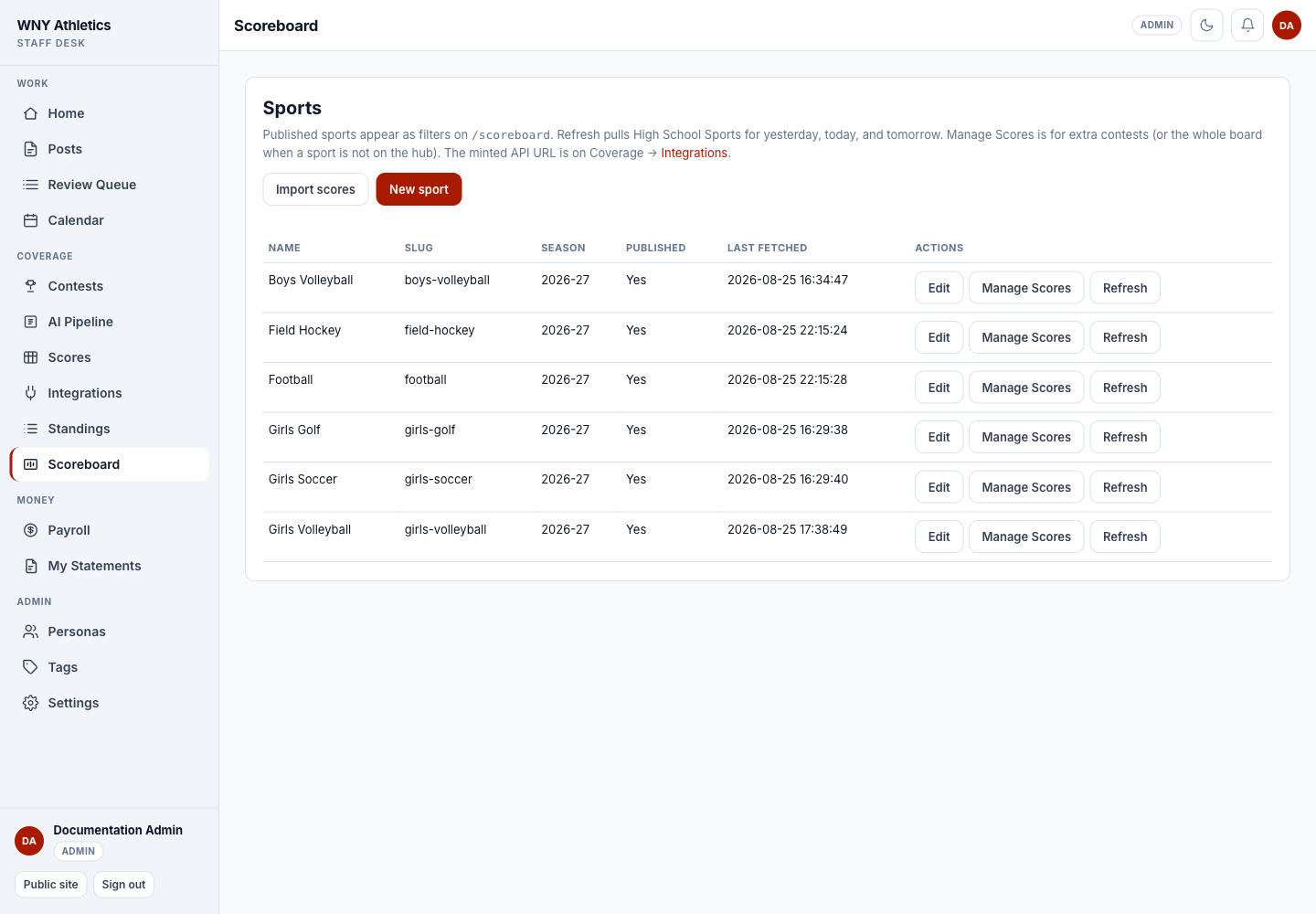
Import scores starts the manual CSV/XLSX wizard; New sport adds a catalog row.
-
Each row records its slug, season, published state, and last fetch.
-
Edit, Manage Scores, or Refresh the selected sport.
Add and import manual games
-
Use Manage Scores for a few games
Add or correct staff-owned contests directly. HSS-owned rows remain controlled by the next feed refresh.
-
Use Import scores for a file
Upload CSV or XLSX, match source columns to team/date/score fields, and review the preview.
-
Choose Replace or Append
Replace removes existing staff-entered games for that sport before adding the new manual rows. Append keeps the existing manual rows. Neither option deletes HSS rows.
-
Check the public merge
Manual games are always included. For an HSS-backed sport, they appear beside the feed results for the same date.
Manage score datasets
-
Create a narrowly named dataset
Use the league/source in the name and slug. Choose Manual CSV or Agent API. Keep scope set to the dataset unless a system owner has approved a global replacement.
-
Stage the first file
The first CSV may ask you to map columns. Mapping creates no contests until you stage again and receive a diff preview.
-
Resolve all validation errors
Malformed rows and duplicate contest identities reject the entire file. News Desk does not partly import a bad score feed.
-
Read Added, Updated, Removed, and Orphans
An orphan means a removed contest is linked to coverage. The system requires explicit confirmation before the commit can proceed.
-
Commit or discard
Commit inserts the new set and removes the old dataset rows. Discard keeps the current contest data and closes the staged upload.
Connect an automated score agent
-
Create an Agent API dataset
Save the mapping first by staging a representative manual file.
-
Rotate a dataset token
Only a News Desk admin can create or rotate it. The full token is displayed once; later screens show only a prefix.
-
Give the agent its URL and token securely
The agent sends a Bearer token and a unique Idempotency-Key with each CSV or JSON payload.
-
Keep auto-commit off at first
Review staged diffs until the feed has proved reliable. Auto-commit works only when validation is clean and no orphan confirmation is needed.
-
Revoke immediately if exposed
Revoking clears the stored hash and makes the previous token fail. Rotate downstream configuration before resuming the feed.
Frequently asked questions
Does Scoreboard Refresh delete my manual games?
No. Manual rows are preserved and merged with HSS results.
Does a Scores dataset commit append rows?
No. It replaces that dataset’s complete contest set unless the dataset is discarded before commit.
Why did the first upload only show a mapping screen?
The first file establishes how source columns map to News Desk fields. Submit it again with the approved mapping to stage the data.
What is an orphan warning?
A contest scheduled for removal is linked to published or in-process coverage. Review the story link before confirming removal.
Is the public scoreboard a live ticker?
No. It refreshes data on load/request and may use a cached or last-good response.