Public registration, one team or a whole club
A team registers itself, or a club director enters several teams in one pass with shared contacts and a per-team division, name, and code. Every entry ends in a printable confirmation.
Product tour
Eight sections, in the order a tournament meets them—from the first entry through the last export. Everything on this page is built and shipped. Nothing here describes something we plan to add later.
Registration, teams, and contacts
Before anything is scheduled
Registration is where a tournament acquires its field, its contacts, and its fee picture. WNY Athletics takes all three at once, so nothing has to be re-keyed later — and the contacts stay with the organization after the event is over.
Fees are recorded and tracked inside the tournament — WNY Athletics does not process card payments, and money never moves through the platform. You see each team’s fee, balance, and status, and you record what you actually collected.
A team registers itself, or a club director enters several teams in one pass with shared contacts and a per-team division, name, and code. Every entry ends in a printable confirmation.
Each team carries its own coach, director, captain, and other contacts. That is who a schedule change reaches later, and who the check-in desk asks for.
The USAV or AAU team code can be hidden, optional, or required — per tournament, not per registrar.
Each division sets its own open and close times and its own fee for each window, with an optional late surcharge at the tournament level. A division can also close registration on its own. The division fee is authoritative, so a free division is free.
Entry fees are calculated, balances and payment status are tracked, and payments, voids, and refunds are recorded by an admin as they happen.
Contacts belong to the organization: derived and custom tags, known-contact autocomplete, an admin panel, mass select with bulk email and bulk tag add or remove, and your selection preserved as you filter.
Import staff and rosters with paste mode, a dry run, and an editable preview before anything is written.
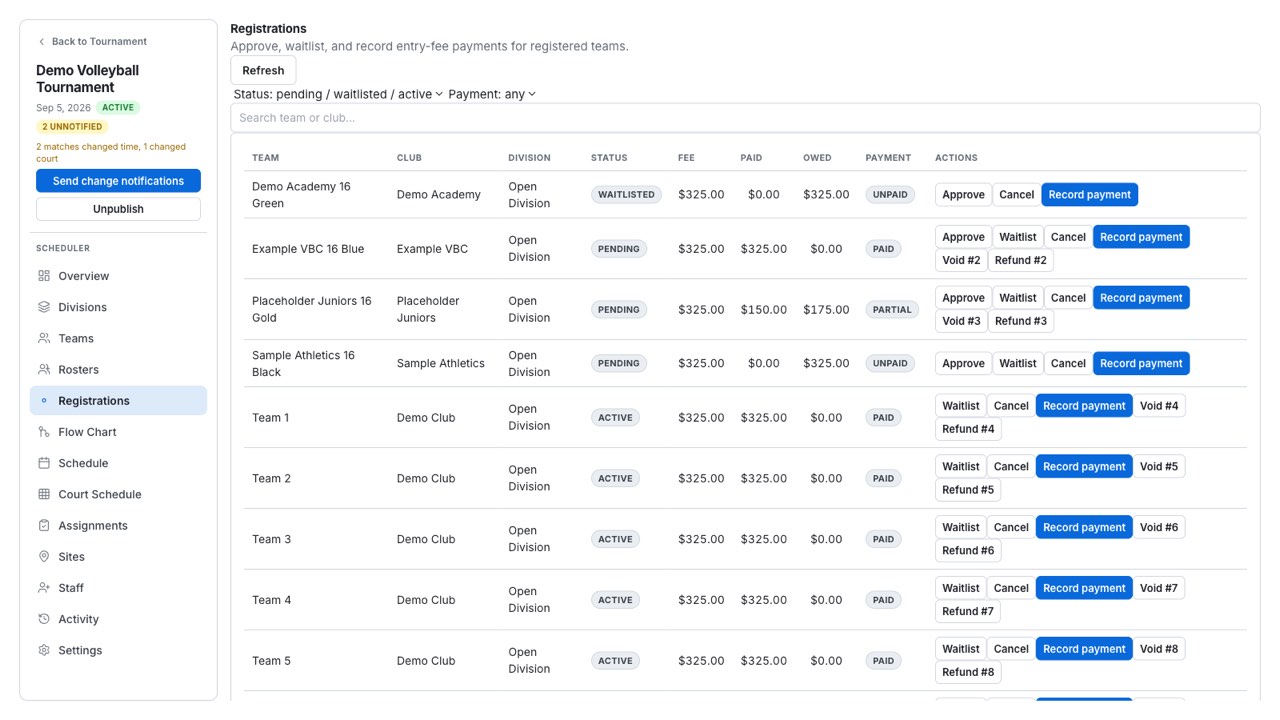
The field, the contacts, and the fee picture are already in place when you start building the schedule.
Format, seeding, and advancement
Shaping the event
Most tools model a clean bracket. Real events have partial pools, day-two reseeding, crossovers, consolation minimums, and a challenge match somebody promised. WNY Athletics treats those as first-class, not workarounds.
Clone a prior tournament and re-date it — end dates, structure, and blackouts shift together — or start from a saved template with optional contest copying. Copy a division’s structure, duplicate a round, or create several divisions at once with settings carried across.
Format presets from team count, per-group scoring formats, and partial pool round robins set by matches per team when a full round robin will not fit the day.
Quick seed with club·team labels and a wide preview, and day-two pool seeding drawn from the previous round’s standings.
Whole-division advancement with crossover sources, a bracket shape preview with live slot, bye, and match counts, minimum-contest consolation, and challenge matches as first-class flow-chart groups with Winner and Loser advancement.
Previewing or applying advancement rules counts the first-round and potential second-round same-pool rematches your destination brackets would create. It reports the risk and changes nothing — the call stays yours.
Generate contests in bulk at round or division scope, and work a setup readiness checklist before the schedule starts.
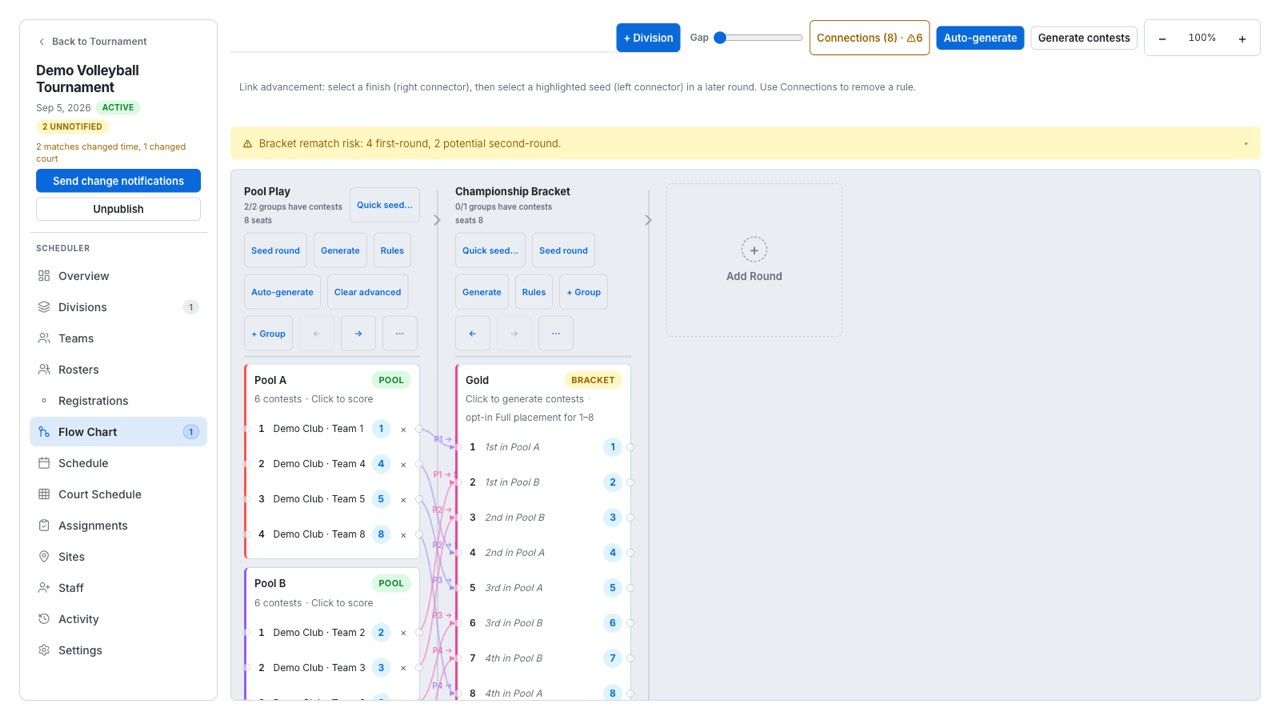
The format is settled — and reusable — before a single court time is assigned.
Court scheduling and safe changes
Building the day
Scheduling is where most tournament software stops being helpful: it will hold your times, but it will not tell you the plan is impossible. WNY Athletics enforces the constraints while you work and refuses the moves that would violate them.
Choose dates, courts, and a wave pattern, then preview every placement. Any group the builder could not place is listed with the reason, alongside minimum-rest warnings.
Format maps cover pools of two to eight teams across one to four courts. Each map carries its work-team assignment and court preference — including the standard six- and seven-team work orders — and realigns when the court format changes.
Day window, lunch band, and warmup and transition gaps are enforced as you place. Lunch is treated as a court conflict, and a cascade that would push play across a blackout is refused outright.
Minimum rest between a team’s obligations is checked and flagged — on the block and in the auto-build preview — rather than blocked, because a short turnaround is sometimes the right call. Treat a rest warning as a question, not a rejection.
A server-side recheck finds court and blackout overlaps and team double-books, scored by role: two playing assignments at once is a high-severity conflict, a play-versus-work collision is medium, two work duties is low.
Change detection catches another editor’s edits before yours land, so a second director does not quietly overwrite the first.
Venues and courts live in an organization-level catalog — site to court, with addresses and notes — importable and reorderable, and pulled into a tournament rather than rebuilt for every event. A bulk court generator and court reorder handle the rest.
Delay or postpone, swap two contests in one batch, nudge a start with the arrow keys, filter the board to a single team, and work across days with multi-day move, copy-day layout, and an all-days occupancy strip. Undo covers structure deletes and schedule edits.
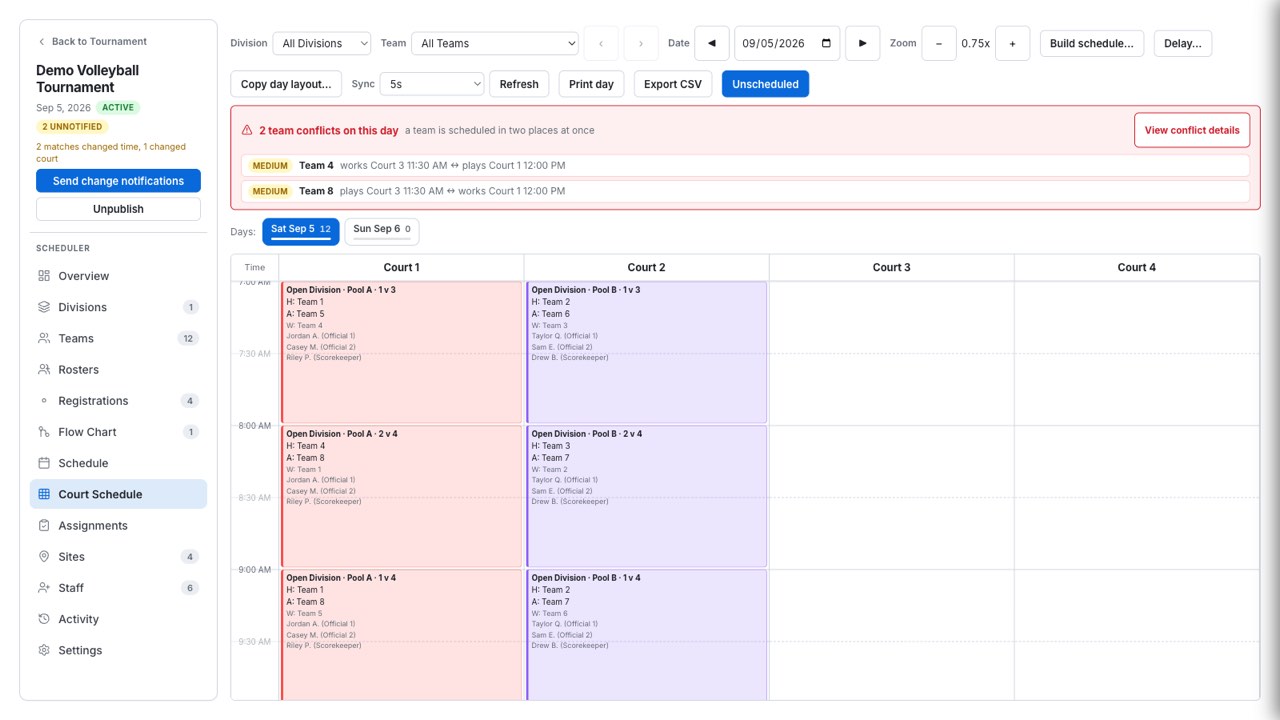
The conflict surfaces at your desk instead of at court six.
Publish, notifications, and announcements
Telling everyone
A schedule change is only half done when the schedule is right. WNY Athletics shows you what moved, who it affects, and the exact message — before anything sends.
Publishing gates the public schedule and snapshots contest times and courts. The next republish shows a diff of exactly what changed, so the update you describe matches the change you actually made.
A schedule change generates a notification scoped to the teams and staff it touches — not a blast to the whole event.
The send preview lists the recipients and shows the exact email. Contacts that would be skipped are reconciled and shown, and you can choose recipients selectively.
Both audiences have their own send path, so a message to officials never lands in a coach’s inbox by accident.
Text messaging is per-deployment. When it is not configured it simply does not send, and the email path is unaffected.
Post a dismissible banner at info, warning, or urgent level to everyone watching, without emailing anybody.
One change produces one message, aimed at the people who need it.
Check-in and game-day operations
Doors open
On the day, the questions arrive faster than the answers. The check-in desk, the master schedule, and the public pages all read from the same record, so the answer is the same wherever it is asked.
Check teams in, see what has already been checked in, and add, edit, or remove a team’s contacts from the desk or the team drawer while the coach is standing there.
Delay or postpone, swap two contests in one batch, undo a schedule edit, nudge a start time, or filter the board down to one team when a club asks where they are next.
Print pool sheets, brackets, and day cards for the scorer’s table and the front desk.
A dismissible announcement — info, warning, or urgent — reaches everyone on the public pages without a single text message.
Team lifecycle statuses and bulk team actions let you withdraw an entry, rebuild the affected group, and republish with a diff of what moved.
Routine answers stop needing a director, so the exceptions get your full attention.
Scorekeeping and live public experience
While the match is live
Scoring is the moment a tournament either stays current or falls behind, and the bottleneck is almost always access. WNY Athletics opens submission three ways and refuses everything else — so you can hand out a PIN without handing out your tournament.
Who can submit a score
Anyone with the link can watch a live match. Entering the score is gated—and the third branch is the one that changes how a tournament staffs its courts.
An org admin of the tournament the contest belongs to.
Someone signed in who holds your organization’s scoring permission—no admin rights needed.
A short per-contest key opens the scoring page. No account of any kind—this is how a parent at the scorer’s table scores a match.
A wrong, expired, or other-contest key is refused outright. It never falls back to whatever account happens to be signed in on that device—so a PIN opens exactly one match, and a shared tablet at the desk cannot become an accidental back door.
A key unlocks exactly one match. A work team that scored the previous match cannot reuse its PIN on the next one.
Keys are minted automatically from an alphabet with no zero, letter O, one, or letter I — so a PIN called across a gym is not ambiguous. An owner can rotate a key at any time.
Submit-final verifies with a staff PIN and updates standings and brackets, so a result does not need a second data-entry pass to move the tournament forward.
Offline drafts, retry, forfeit recording, and scorekeeper name capture keep a court working through a dead connection.
Score corrections, match moves, and archives are written to a searchable activity table with before-and-after diffs.
Public pages refresh badges, scores, and standings from a batched results read, so a phone in the stands and a laptop at the desk agree.
A searchable team directory including staff names, club pages with next match and record, pool sheets and brackets, work duty, printable day cards, directions, QR sharing, and a court monitor with a denser kiosk layout, clock, and auto-refresh for the front desk.
Following pins a team in that browser. It is a local convenience, not a profile or a subscription — there is nothing to sign up for and nothing to sign in to.
Teams and officials can subscribe to a calendar feed carrying the venue as the event location. A draft schedule deliberately returns an empty feed — nothing is promised before you publish.
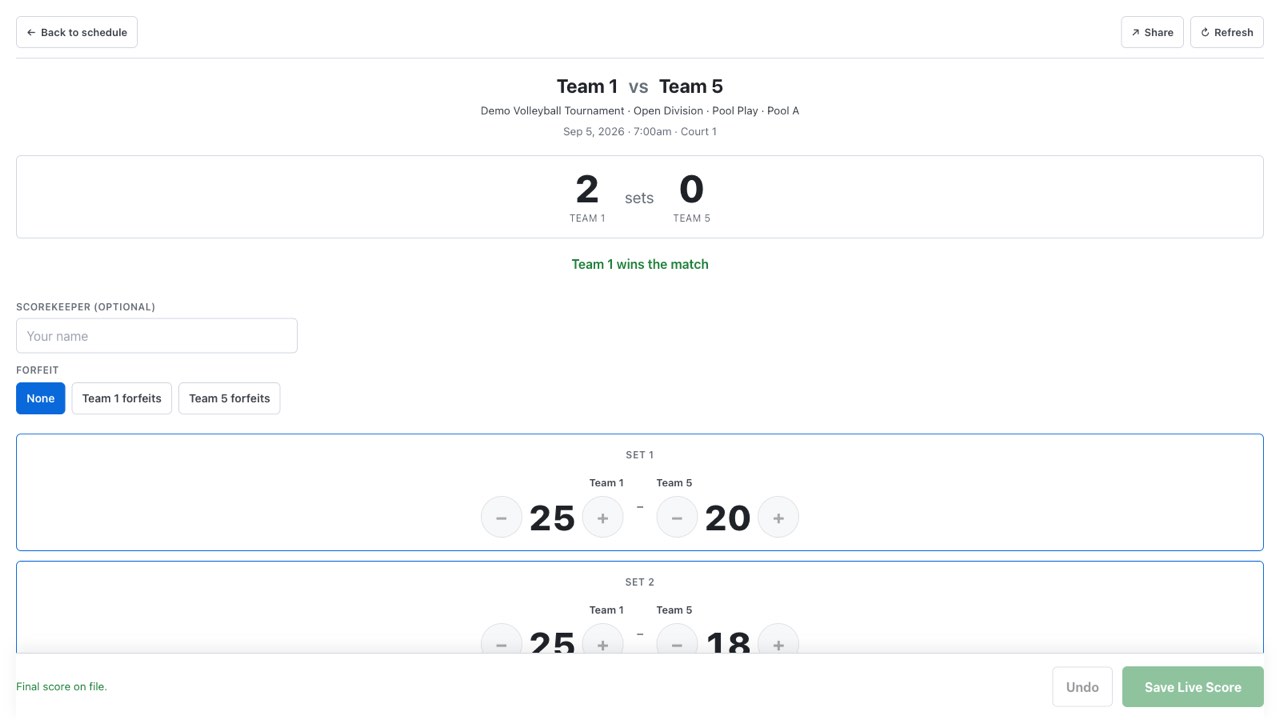
A score entered at the court is the tournament record, immediately.
Officials, payments, and closeout
From availability to payday
Officials are the part of a tournament that runs on text messages and memory. WNY Athletics gives each one a personal link — no account, no app — and gives you a payroll you can close in bulk and defend afterwards.
Two different things share the word “payment,” so this tour keeps them apart. Staff payroll is real: amounts, check numbers, memos, exports, and voids are recorded here. Entry fees are records only — WNY Athletics tracks what a team owes and what you collected, and does not process card payments.
A mass availability request email carries merge tags for the tournament, the dates, and each official’s own self-service link.
An official opens a personal link and sets their availability windows, confirms day by day, and accepts or declines published assignments. A wrong or missing token shows a friendly error and never another official’s data, and authorization is rechecked on every request.
Officials are split into available and unavailable by time overlap — both among the contests you are assigning and against their assignments elsewhere in the tournament — with the conflicting match named.
Per-official rates by contest type — two sets, best-of-three, challenge — plus daily and event minimums, rolled up into earned, issued, and owed.
From the same personal link, an official sees what they have earned, been paid, and are owed.
Pay out in bulk with per-person amounts, check numbers, and memos, and export the run. A voided row stays in place rather than disappearing.
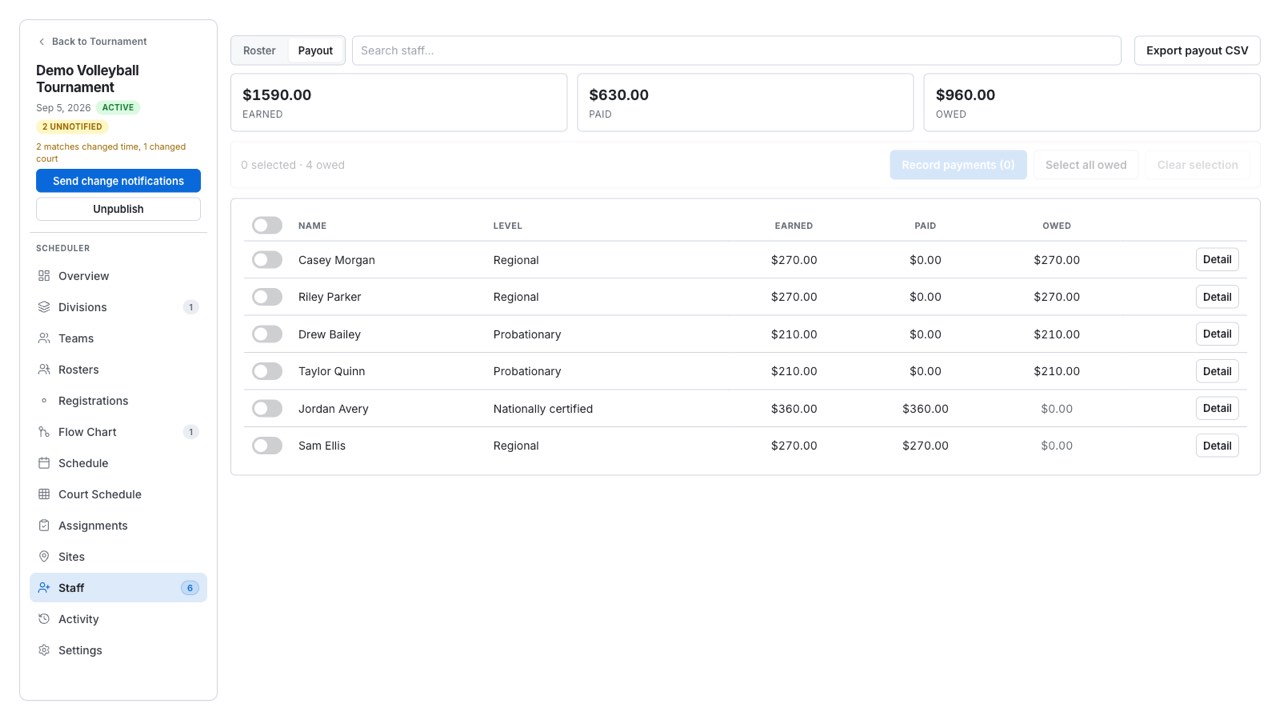
The event closes with the pay run done and the record intact.
Recovery, history, exports, and integrations
After, and for next time
Preventing the problem is half the job. The other half is what happens after something has already gone wrong — and what is still there next season.
Undo covers structure deletes and schedule edits, and an archived tournament can be restored.
Score corrections, match moves, and archives land in an activity table you can search, each with a before-and-after diff.
Every tournament has a stable public link that keeps resolving after the event is renamed, so the link you shared in March still works in June.
CSV export on every admin list, plus the payroll export, so your board’s spreadsheet is a download rather than a retyping job.
Clone and re-date the event, save it as a template, and keep the organization’s contacts, venues, and courts.
Nothing about the event has to be reassembled after the gym empties.
For the club webmaster
This is an early integration surface, not a published API—there is no versioned contract behind it yet, and we would rather say so than imply one. If your club site or lobby display needs something here, say so in your access request and we will talk about it directly.
Team and staff subscriptions carrying the venue as the event location, once the schedule is published.
A tournament’s stable link keeps resolving through a rename, which is what makes it safe to embed on a club site.
Standings are readable publicly, and public reads carry caching headers so a scoreboard page can poll without hammering anything.
One event today: the schedule’s status changing. It is enough to trigger a rebuild of a club page or a lobby display.
That is the whole product
WNY Athletics is set up for you rather than signed up for—we set your organization up with you, so your divisions, courts, and staff are right before the first event. Tell us what you run and a person reads it.