The link opens your days, and only yours
A wrong or missing token shows a friendly error and never another official’s data, and your authorization is rechecked on every request rather than trusted once at the door.
For officials and scorekeepers
Officiating a tournament should not begin with a password reset. Availability comes from a link that is yours, and the scoring page opens with a short PIN for the match in front of you. Neither one asks you to create anything.
Neither confirming your availability nor entering a score requires an account of any kind. There is nothing to sign up for and nothing to install.
Your availability
Weeks before the event
Your director sends an availability request. It carries a personal link, and opening it puts you straight into your own days — no account, no password, no waiting for somebody to add you to something.
A wrong or missing token shows a friendly error and never another official’s data, and your authorization is rechecked on every request rather than trusted once at the door.
Each event day is available all day, unavailable, or partially available — and a partial day carries one or more start-and-end windows, so “after two o’clock on Saturday” is a real answer rather than a note in an email.
Event days are derived from the tournament’s start and end dates, falling back to the dates that already have scheduled matches. You are answering about the days that exist, not filling in a blank calendar.
The roster shows, per person, whether availability is complete, partial, or not submitted — so an unanswered request is visible rather than assumed.
Unconfirmed, unavailable, and out-of-window days are excluded from the automatic assignment pass. A director can still assign you by hand, so silence is not the same as being unavailable — answer the days you cannot work.
It is personal, and anyone holding it can answer as you. It is not meant to be forwarded, and there is no reason to: everyone on the roster gets their own.
You tell the tournament when you are free, once, in your own words.
Your assignments
Once the schedule is staffed
Assignments are drafted first and published per contest. Publishing can email you your work, and the same personal link that carried your availability carries the assignments back.
Your director selects contests and publishes them, which cascades to every filled role slot on them. Only published, active assignments reach your link.
Your answer comes back onto your director’s assignment grid, next to the availability markers and any overlapping assignment.
Publishing notifies you; it does not extract a commitment, and declining does not remove you on its own. It tells your director where you stand, and they make the change.
Officials are split into available and unavailable by time overlap — both among the contests being assigned and against assignments elsewhere in the tournament — with the conflicting match named.
A director’s bulk assignment respects a cap on consecutive assignments and a required break after them, plus a limit on sequential contests on the same court and a team-repeat lookback.
You find out what you are working from the tournament, not from a group chat.
Who can submit a score
Anyone with the link can watch a live match. Entering the score is gated — and the third branch is the one that puts a scorekeeper at the table without an administrator standing behind them.
An org admin of the tournament the contest belongs to.
Someone signed in who holds the organization’s scoring permission — no admin rights needed.
A short per-contest key opens the scoring page. No account of any kind — this is how a parent at the scorer’s table scores a match.
A wrong, expired, or other-contest key is refused outright. It never falls back to whatever account happens to be signed in on that device — so a PIN opens exactly one match, and the shared tablet at the desk cannot become an accidental back door.
Scoring a match
While the match is live
Whoever is at the scorer’s table can enter the score — a certified official, a work-team parent, a table crew of two fourteen-year-olds. What they need is six characters, and what they get access to is exactly one contest.
A key unlocks one match. The work team that scored the previous match cannot reuse its PIN on the next one — that is deliberate, and it is why a director can hand PINs out freely.
Keys are minted automatically from an alphabet with no zero, no letter O, no one, and no letter I, so a PIN called across a gym is unambiguous. A director can rotate a key at any time.
Offline drafts, retry, forfeit recording, and an optional scorekeeper name keep a court working through a dead connection.
The contest key opens the scoring page. Confirming a final score uses a staff score-verify PIN, which lives on an official’s roster record and defaults to the digits of their mobile number. One opens the match; the other signs off the result.
Submitting the final updates standings and brackets directly, so the tournament moves forward without anybody re-keying your score somewhere else.
Score corrections, match moves, and archives are written to a searchable activity table with before-and-after diffs. Fixing a mistake is normal, and it is recorded rather than hidden.
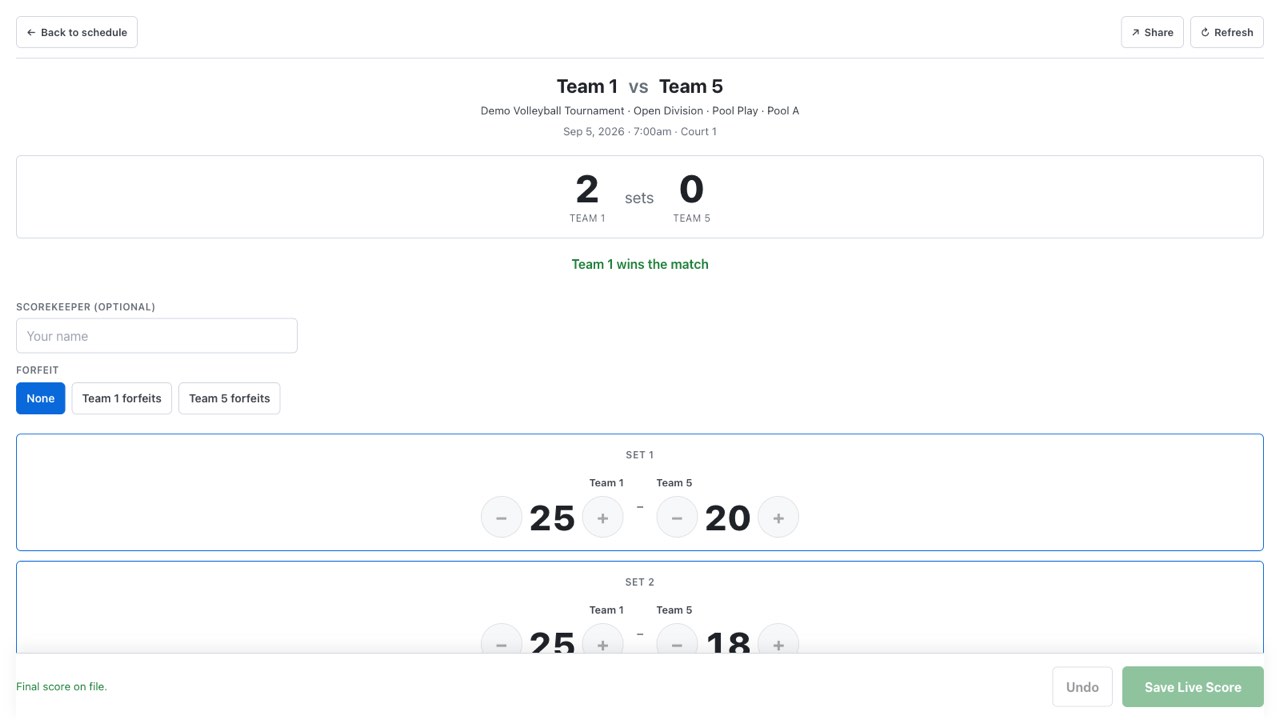
The score at the court is the tournament record, immediately.
What you are owed
During, and after
The awkward conversation at the end of a long weekend is usually about arithmetic. The same link that carried your availability shows what you have earned, what has been paid, and what is outstanding.
Payroll here is the record of what your director paid, with the amounts, check numbers, and memos written down. WNY Athletics does not move money — it does not pay you, and it does not process card payments.
Rates are set per official and per contest type — two sets, best-of-three, challenge — with daily and event minimums, so a short day does not quietly become a small day.
All three roll up on your own record, visible from your personal link rather than on request.
Your director pays out in bulk with per-person amounts, check numbers, and memos, and exports the run. A voided row stays in place rather than disappearing.
Certification level and rates live with your record, and a director can copy a staff roster across from another event in the same organization — so a returning official is not re-entered from scratch.
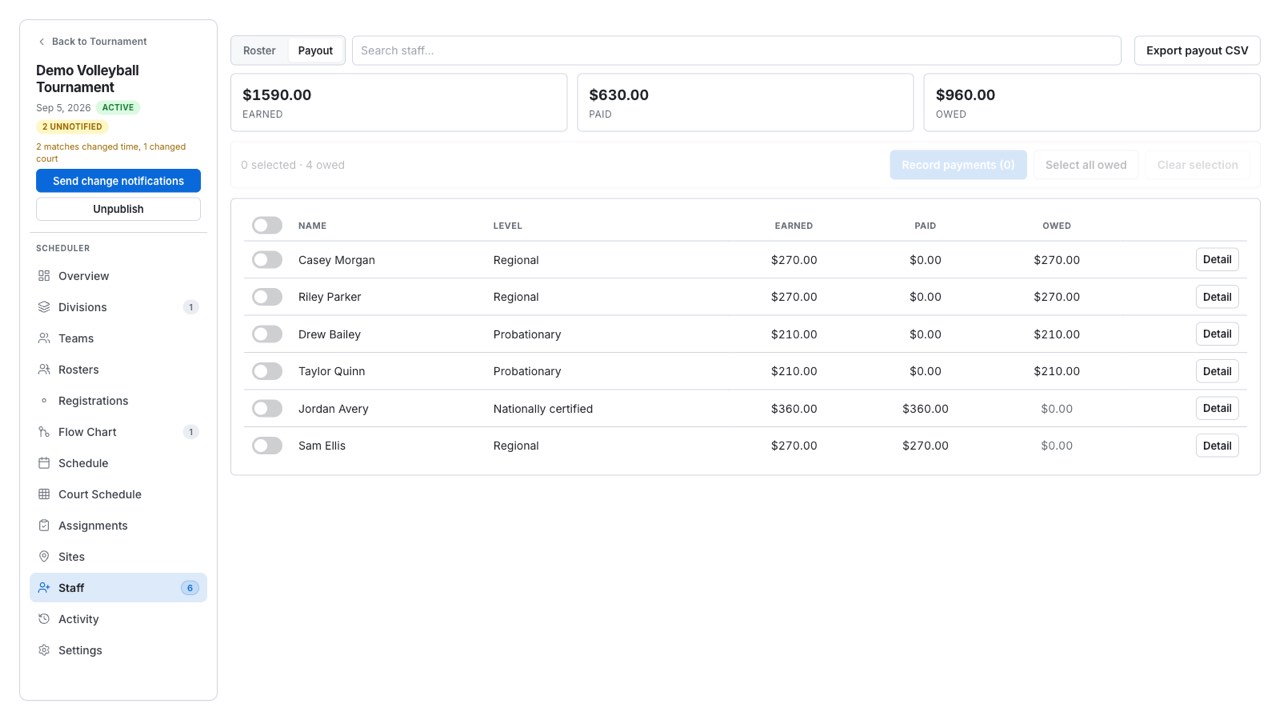
The number you are owed is written down before anybody has to ask for it.
Documentation for the table
Short, and written for someone standing up. Start with the overview if you have never done this, or go straight to scoring access if the controls are not showing.
Nothing to install
If you do not have your availability link or your contest PIN, your tournament director issues both — and can rotate a contest key at any time. If you run events yourself, this is the same record from the other side.