Nothing to create
Viewing a tournament, a team, a pool sheet, a bracket, or a live match needs no account of any kind. Not a trial, not a free tier — there is simply nothing to sign in to.
The live tournament experience
Where are they playing, what time, which court, are they working the next match, and did they win the one you missed while parking. All of it on one page, from the link the organizer shared.
No account needed. Nothing to download, nothing to sign up for — open the link and everything below is already there.
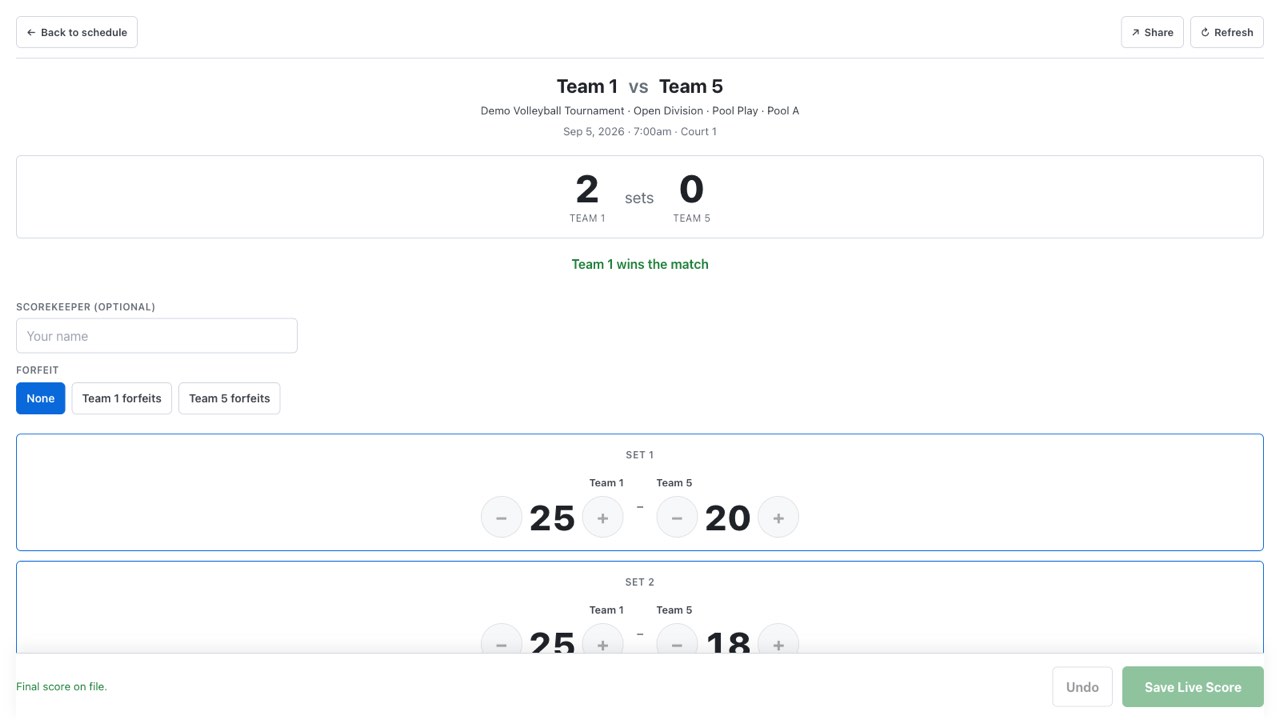
A live match. Anyone with the link can watch it; entering the score needs the PIN the organizer hands the scorer’s table.
Open the link
The week before
There is no sign-up step to get past. The organizer shares a link, you open it, and you are looking at the tournament — on the phone in the parking lot as easily as on the laptop at home.
Viewing a tournament, a team, a pool sheet, a bracket, or a live match needs no account of any kind. Not a trial, not a free tier — there is simply nothing to sign in to.
Paste the public link, or type the organizer’s code in org-slug/tournament-slug form, and the event opens. Both halves are required on purpose.
Tournaments are deliberately not listed anywhere to browse. Recovery needs both lookup keys, so nobody can page through an organization’s events — including yours.
The events you have opened stay listed on this device for up to ninety days, with a Clear control right beside them. It is stored in your browser; no account and no browsing history is sent anywhere to build it.
Every tournament has a stable public link that keeps resolving even after the event is renamed, so the one you bookmarked in March still opens in June.
A link that does not resolve gets a plain “tournament not found” page pointing you back at the organizer, rather than a blank screen and a guess.
Getting to the tournament is one tap, from anywhere, on anything.
Find and follow
Once you are in
A big tournament is a long list of teams. Search it once, star the team you came for, and it is waiting at the top of the page every time you come back.
The directory is searchable, including by staff name — useful when you know the coach and not the roster number.
Following pins a team to a My teams list on the tournament’s front page. It lives in your browser: not a profile, not a subscription, nothing to sign up for and nothing to cancel.
If you are following more than one team from the same club, a club page collects them with each one’s next match and record.
One page carries a team’s schedule, work duties, results and record, venues, and roster.
Your team is one tap in, every time, on the device you already have.
Read the day
Tournament weekend
Volleyball tournaments have their own vocabulary, and most of the confusion in a gym is somebody reading the wrong sheet. Each view answers one question and says which one it is answering.
Each match shows its court and start time, whether it is live, pending, or final, and the set scores once they exist.
A pool shows its teams, its matches, and the standings that come out of them — the sheet the whole pool is reading from.
Brackets show the path forward. An organizer can choose to hide bracket seed numbers on the public view; pool schedules always show their group seeds.
When your team is working a match rather than playing one, it sits on the same schedule — so “are we up next or are we scoring next” is something you read.
Until the organizer publishes, a team’s schedule tab says the schedule has not been published yet and the pools show standings and team lists without match cards. You are never reading a draft by accident.
The pool sheet and the single-elimination bracket each carry a print button on the public page, and the printed pool sheet comes out with blank score lines and clean page breaks.
You read the day the same way the scorer’s table does.
Getting there
Saturday morning
The part of a tournament weekend that has nothing to do with volleyball: what time to leave, which building, and how to get the schedule onto the phone of the grandparent who is meeting you there.
Once the organizer publishes, a team’s schedule is available as a calendar subscription carrying the venue as the event location. Before publish the feed is deliberately empty and the link is not offered — nothing is promised early.
Each venue carries its address and directions, which matters at the events where pool play and brackets are in different gyms.
A share control passes the team or tournament link to whoever is asking, and it keeps working after a rename.
Organizers can print a QR poster for the door and the front desk. Scanning it opens the tournament on your phone — no typing a link off a wall.
Everyone arrives at the right gym with the right schedule already on their phone.
Watch it live
While it is happening
Two courts over, or two hundred miles away. Scores move as the match moves, and the board by the front desk answers the question everybody is asking the tournament director.
Anyone with the link can watch a live match. Only entering the score is gated, and that is done by the scorer’s table with a PIN for that one contest.
Badges, scores, and standings refresh on their own from a batched public read, so the phone in the stands and the laptop at the desk agree.
A court monitor shows now and next, one card per court location, in a denser kiosk layout with a clock and auto-refresh — the screen you check instead of asking.
Organizers post a dismissible banner at info, warning, or urgent level. “Courts one and two are running thirty minutes behind” reaches the gym without reaching your inbox.
A submitted final updates standings and brackets directly, so the next match is on the board while the teams are still shaking hands.
You always know what just happened and what happens next.
Documentation for teams and families
Seven short articles on entering a team, finding the gym, reading a bracket, and recovering when a link or a notice does not do what it should.
Somebody had to make this the plan
Everything on this page is a by-product of the tournament being run in one place. If you organize events and want your weekend to look like this, access is arranged by a person rather than a signup form.