Several teams, entered together
Enter your teams in one pass with shared contacts, then set each team’s own division, name, and code. You are not filling in the same club director four times.
For club directors and coaches
Registering four teams should not mean filling in the same coach and director four times, and finding out about a court change should not mean refreshing a group text. You enter the club in one pass, and everything after that comes to you.
Following your teams needs no account. Registration asks for your contact details because that is who the organizer notifies — nothing else.
Register the club
Entries are open
A single team registers itself in a couple of minutes. A club enters several teams together — the contacts you share once, the division, name, and code per team — and finishes with a printable confirmation for your records.
WNY Athletics keeps the fee record — what your entry costs and whether it is unpaid, partial, paid, or refunded. It does not take card payments. You pay the organizer the way that organization already collects money, and an administrator records it, which is what moves the status.
Enter your teams in one pass with shared contacts, then set each team’s own division, name, and code. You are not filling in the same club director four times.
Coach, director, captain, and other contacts attach to each team individually. That is exactly who a schedule change reaches later, so it is worth getting right at entry.
The USAV or AAU team code can be hidden, optional, or required — the organizer sets it per tournament, so you only see the field when it matters.
Each division has its own early, regular, and late windows, each with its own open and close time and its own fee, and the organizer can add a late surcharge. The division fee is authoritative, so a free division is genuinely free.
The organizer approves or waitlists each entry as it lands. The results panel and the confirmation email carry each team’s division, entry fee, and payment status, and every contact you listed gets their own copy rather than a shared digest.
The club is entered, and every team carries its own contacts and its own status.
Who hears from the tournament
Between entry and game day
Notifications are not broadcast to an event-wide mailing list. When something moves, the organizer previews who it affects and sends to them — which means your contact details are the whole mechanism.
A club with four teams has four sets of contacts, so the under-14 coach is not reading about the under-18 court change.
A contact that is wrong or missing can be added, edited, or removed at the check-in desk while you are standing there — you do not have to re-register to correct an email address.
Contacts belong to the organization rather than the single tournament, so a club that comes back next season is already known rather than re-typed.
Messages go out by email. Where the organizer’s deployment has text messaging configured, a short SMS goes alongside it; where it is not, only the email sends.
The court change reaches the coach who needs it, not the club’s whole address book.
The schedule and its changes
From publish to the last match
The schedule you are reading is the same record the director is editing. Before it is published the public pages say so plainly rather than showing you a plan that is still being built; after it is published, a change to your matches comes to you.
Until the organizer publishes, a team page’s schedule tab says the schedule has not been published yet, and pools show standings and team lists without match cards. You are never reading a draft by accident.
When the schedule changes, the notification is scoped to the teams and staff affected. The organizer sees the exact message and the recipient list before it sends.
Publishing snapshots contest times and courts, so a republish produces a diff of exactly what changed — which is why the message you get describes the actual change.
A dismissible banner at info, warning, or urgent level appears on the public pages, so “courts one and two are running thirty minutes late” does not need to become an email.
Badges, scores, and standings refresh on their own from a batched public read, so the phone in the stands and the laptop at the desk agree.
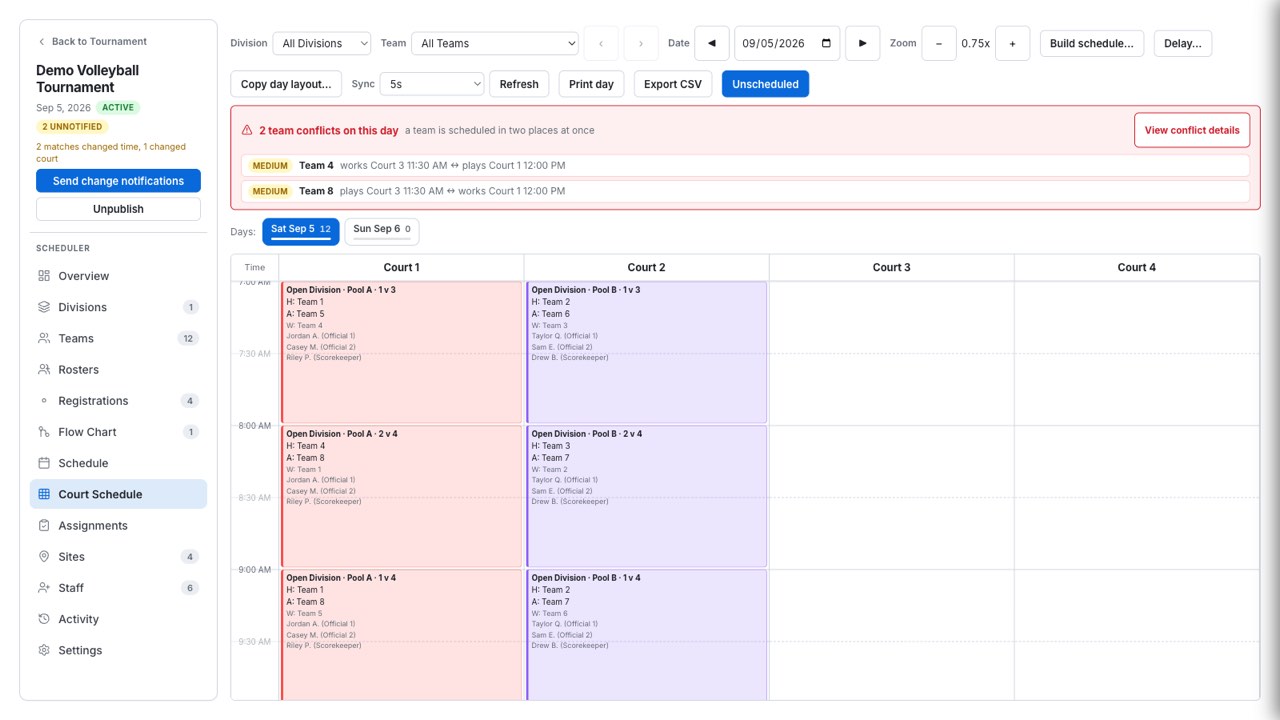
You stop screenshotting the schedule, because the schedule is current.
Follow your teams
All weekend
A club director does not want four bookmarks. Star the teams you care about and they stay pinned on the tournament’s front page, alongside a club view that answers the only two questions anybody asks: who is next, and how are we doing.
The team directory is searchable, including by staff name, so you can find a team when you know the coach and not the roster number.
A club view collects your teams with each one’s next match and record.
Following pins a team in that browser. It is a local convenience — not a profile, not a subscription, nothing to sign up for and nothing to sign in to.
One page carries a team’s schedule, work duties, results and record, venues, and roster — the questions parents ask you, answered without you.
The tournament’s public link keeps resolving even if the organizer renames the event, so the link you sent your parents in March still opens in June.
Paste the public link, or type the organizer’s code in org-slug/tournament-slug form, and it opens. Tournaments are deliberately not listed in a public directory — recovery needs both keys, so nobody can browse an organization’s events.
The club follows itself, and the questions stop routing through you.
Getting there and reading the day
Tournament weekend
The practical half. Where to be, when to be there, which matches you are working, and what to hand the parent who has asked three times.
A team’s work assignments sit alongside its matches, so the pool’s work rotation is something you read rather than something you reconstruct from the pool sheet.
Once the organizer publishes, a team’s schedule is available as a calendar subscription carrying the venue as the event location. Before publish the feed is deliberately empty — nothing is promised early.
Each venue carries directions, a share control, and a QR poster you can print for the club table.
The pool sheet and the single-elimination bracket both carry a print button on the public page, and the printed pool sheet adds blank score lines and page breaks for the scorer’s table.
If the organizer asks your team to score a match, they hand you a short PIN for that one contest. No account, and the PIN opens that match and nothing else.
A court monitor shows now and next, one card per court location, with a kiosk layout and a clock — the screen you point a parent at instead of answering again.
Your team knows where it is playing, where it is working, and how to get there.
Documentation for coaches and teams
Seven articles covering everything a coach, a team, or a parent can do — all of it without an account, except entering the team itself.
And if your club runs its own event
Clubs that host as well as enter run the whole event on this — entries, format, court schedule, officials, game day, and payroll. Access is arranged by a person rather than a signup form.